
AndCAD Demo1.9.0 - Get APK
You'll be able to download in few seconds.
Publisher Description
Development has restarted after the parent company regained ownership of AndCAD.
(September 26, 2016)
Minor updates in this build - Mainly to suit new company location and information.
Other updates:
Tools with "long press" options, have been marked with a red stripe to let you know that further options exist.
Tooltip created to reflect "long press" enabled tools.
Application modified to suit new Android Studio requirements.
For assistance using the application and it's tools, please download and install the integrated help file. It is located on the Play Store, and you can find it by following this link.
https://play.google.com/store/apps/details?id=net.talondesigns.andcad_help
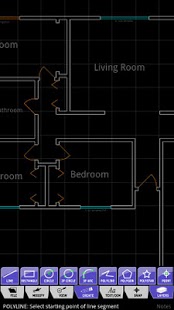
AndCAD is a full 2D CAD application for Android. Create and edit drawings directly on your mobile device. You can now take CAD anywhere you need to go!
Key Features:
True Vector Objects
Object Snapping
Direct Unit Input
Full Layer Support
Image Underlay
AutoCAD® DXF Import/Export (beta)
Landscape (WS) & Portrait Mode
Tablet Support
Geometric Objects:
Line, Circle, Arc, Polyline, Polygon, PolyStar, Point, Text, Note, Linear Dimension, Aligned Dimension
Edit Tools:
Free Edit Mode, Move, Copy, Rotate, Scale, Break
Upcoming Features:
Additional Dimension Types
Block/Symbol Support
Trim
Extend
Mirror
Offset
Fillet
Chamfer
Demo Restrictions:
Save/Export Disabled
DXF Import limited to 100k file size.
PNG output only saves a portion of the screen
Otherwise everything works just as the paid version.
Contact:
developer@talon-designs.us
About AndCAD Demo
The company that develops AndCAD Demo is Talon Designs. The latest version released by its developer is 1.9.0.
To install AndCAD Demo on your Android device, just click the green Continue To App button above to start the installation process. The app is listed on our website since 2016-09-26 and was downloaded 0 times. We have already checked if the download link is safe, however for your own protection we recommend that you scan the downloaded app with your antivirus. Your antivirus may detect the AndCAD Demo as malware as malware if the download link to net.talondesigns.andcad_demo is broken.
How to install AndCAD Demo on your Android device:
- Click on the Continue To App button on our website. This will redirect you to Google Play.
- Once the AndCAD Demo is shown in the Google Play listing of your Android device, you can start its download and installation. Tap on the Install button located below the search bar and to the right of the app icon.
- A pop-up window with the permissions required by AndCAD Demo will be shown. Click on Accept to continue the process.
- AndCAD Demo will be downloaded onto your device, displaying a progress. Once the download completes, the installation will start and you'll get a notification after the installation is finished.
Program Details
System requirements
Download information
Pricing
Version History
version 1.9.0
posted on 2016-09-26
Development has restarted after the parent company regained ownership of AndCAD.,Minor updates in this build - Mainly to suit new company location and information.,Other updates:,Tools with "long press" options, have been marked with a red stripe to let you know that further options exist.,Tooltip created to reflect "long press" enabled tools.,Application modified to suit new Android Studio requirements.
version 1.8.2
posted on 2011-03-02
Several fixes and updates
Disclaimer
External Download
We do not host AndCAD Demo on our servers. We did not scan it for viruses, adware, spyware or other type of malware. This app is hosted by Galad and passed their terms and conditions to be listed there. We recommend caution when installing it.
The APK Download link for AndCAD Demo is provided to you by apps112.com without any warranties, representations or guarantees of any kind, so access it at your own risk.
If you have questions regarding this particular app contact the publisher directly. For questions about the functionalities of apps112.com contact us.
